MS SQL starts on wrong port

Over the past few days we’ve been working with one of our clients to develop an enterprise search solution for one of their databases. Due to various historical reasons, the database is on MS SQL and has to stay that way. No worries right? Fail.

I decided to move forward with Solr because of its DataImportHandler feature and its ability to easily expose search results in various formats (JSON, XML, PHP serialized objects, etc).

For some reason I can’t seem to get MS SQL server to open on the port it is configured to. This proved particularly hairy to debug because I couldn’t tell if my JDBC DSN binding was failing, the JDBC driver was failing, or if the DB server was actually mucking it up.

The JDBC URL I’m using is:

url=”jdbc:sqlserver://localhost:1170;databaseName=dbName;User=test;Password=*****”

To try and narrow things down, I used the Eclipse Data Tools package to let me use a JDBC driver from within Eclipse to connect to the server. Using this, I could clearly see that the exception being thrown was that the MS SQL server was not accepting connections on port 1433.
As far as I can tell MS SQL is set up correctly.

sql-server-1

sql-server-2

I checked the MS SQL start up log and it was showing this:

Server is listening on [‘any’ 1170]

I tried using 1170 in Eclipse and Solr and bang everything fell into place.

What is weird is that the configuration is showing that the server should be running on 1433.
If anyone has any idea why this is happening I’d love to know for future reference.

I replicated this behavior on a production machine. In both instances I was using MS SQL Server 2008 Express. On the dev box I was running Windows XP SP2+ and the production box was running Windows Server 2003.

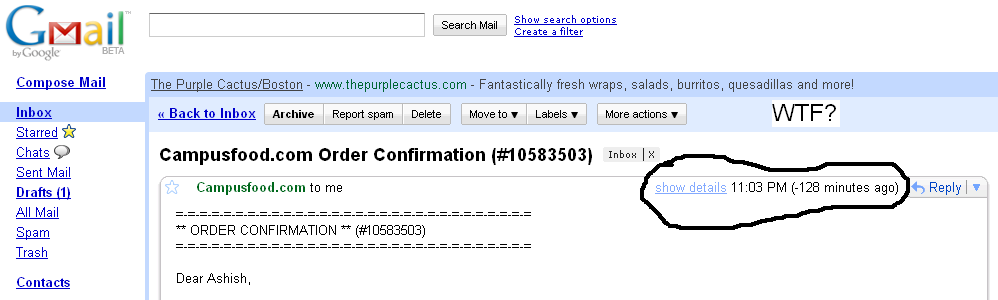
Gmail fail

Looks like someone at gmail forgot to make sure the system won’t display negative time for future timestamped emails. I’m not sure where/how this email got a bad timestamp but gmail is displaying it as being sent in the future!
See it!

Hello Android!

In the last few weeks the battle and buzz over the smart phone market seems to have seriously intensified.

First there was the usual iPhone buzz, news about the Android powered HTC Magic, the Windows Mobile marketplace, and of course the obligatory ridiculousness at Microsoft.

I’d been considering experimenting with a mobile platform for sometime and finally decided to take the plunge. I decided to give Android a whirl primarily because I don’t have easy access to OSX or Visual Studio and my Java is less rusty than my .NET.

Anyway, getting going with Android was deliciously simple – download the SDK+Emulator and Eclipse plugin and you’re off.

After the necessary “Hello World” application I tried to write something a bit more substantive. Personally, one of the coolest facets of mobile development is the ability for applications to be location aware (GPS). Mix this together with some openly available geo tagged data and the result is probably going to be interesting.

With this in mind, the plan became to mash together Android’s GPS coordinates with flickr’s geotagged photos.

Getting access to Android’s location service is fairly straightforward. You basically register to receive updates either when the device moves a certain distance or on some time interval:

The biggest “gotcha” with this is that you NEED to remember to modify the default Application security settings to allow you to access the device’s location. In Eclipse, edit AndroidManifest.xml and add “UsesPermission” for the following: android.permission.ACCESS_MOCK_LOCATION, android.permission.ACCESS_COARSE_LOCATION, android.permission.ACCESS_FINE_LOCATION

So on to part II – using the device’s location to pull down Flickr photos. I’d used the Flickr API before so I knew how to do it but I’d never used it from Java. I tried loading the JAR for the flickrj client library but the Android JVM was having some strange issues with it. I was under the impression you can link to external JARs from Eclipse but I may be wrong (anyone?).

Anyway, the Flickr requests were un-authenticated and pretty straightforward so I decided to use Java’s URL class. Accessing sockets was another “gotcha” – Android requires your application to have the “UsesPermission” android.permission.INTERNET to use sockets. The exception when the permission isn’t set is notably cryptic – “unknown error”.

I decided to download all the Flickr photos to the device so that the UX would be generally smoother. This introduced threading to the project so that the UI wouldn’t freeze up while the photos were downloading. Android threads work just like traditional Java threads and the process was generally painless:

With the photos pulled down the final task was displaying them. After poking around the Android documentation I discovered the Gallery widget. It basically allows you to display a set of items in a list and specify a “renderer” for the gallery. I’m not sure if there is a default way to make it “fisheye” (like on an iPhone) but I rolled a quick n dirty solution for that. I also couldn’t get it to look really sexy but that’s also probably possible.

So that’s about it. Here are some screen shots of the application running in the emulator:

And without further a due here is the code as an Eclipse project.
geoflickr

Anyway, before the bashing starts – I know I’m a terrible Java programmer and that this project isn’t really engineered beautifully. It was just supposed to be a way to get my (and anyone else’s) feet wet with Android. Any comments/thoughts/improvements are of course welcome!

Merry Christmas and Happy Holidays

Setfive would like to wish everyone a merry Christmas and happy holidays.  We hope everyone has a great holiday season.  We’ll be bringing in the new year with a bang, and look forward to working with you.

Happy Holidays All!

Joins, for better and for worse

Recently I’ve been having one hell of a time with SQL Joins. It isn’t that I don’t understand how to use them, its that they have came to haunt me in completely opposite instances.

First: An application I had written a while ago that was suppose to be kept small, and very simple which continually was enlarged and became very big was running slow. I upgrade the person to our faster server believing it was just that our server that is meant for static sites couldn’t handle it. While it did greatly reduce the load time of the site(1/6) it was still slow for me. I looked into it and found that after all the alterations of the application which we had done, that one page had 1600 queries at its current state.

Before you think down upon our development abilities and our code efficiency let me put everything in perspective. The project was started as a very simple CRUD only database, that we did basically free for the a client who was a friend. Shortly after it continually was being expanded upon, and the friend could only afford minimal costs, so he asked us to just “hack” it together as it was a prototype. Well about a month later after development, we had possible one of the most hacked together prototypes for him. He never wanted to redo it from scratch so we could architect it correctly due to the cost. For the prototype, it worked fine and very fast. However the prototype turned into a beta test for the friend. He added much more information to the database, and the inefficient queries began to show. Now the application is loaded with information, and the inefficient queries are terrible. We have told him that if he plans to use this we should rewrite it from scratch as many other cool features could be used.

So back to the problem. Well we attempted to add JOINs to the program which should cut the number of queries by at least 1/10th. However when I added the left joins via Criteria/Propel I found that it was adding the joins twice. The reason they needed to be left joins is because the foreign keys were not required,